|
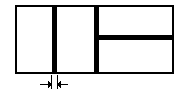
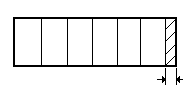
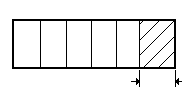
The Technological Options condition the cuts/parts layout in the cutting patterns in order to fulfill the technological requirements demanded by both the cutting tool and the material, adjusting this way the cutting variants generated by the calculation engine to the existing technology. To configure your technological options, select Launch Options from the Tools menu and access the Cutting tab. Note: The first default assumed technological option is the guillotine cutting restriction which should condition the way the calculation engine generates cutting variants and not necessarily the cutting technology used. Rip cutting, for example, always contains guillotine cutting. Since Corte can really reach striking optimizations, we’re sure the program can be used with high efficacy wherever rectangular pieces are to be cut off even if the technology used is less restrictive than guillotine cutting. The configurable technological options are: Cut Width: Defines material strips of the specified width that the cutting tool smoothes out. Geometrically, it corresponds to a distance or separation between parts in the cutting patterns.
Residue Minimum Length: Defines a minimum length for the residue, offcut or scrap that may be left in a semiproduct beyond the last cut. When active, cuts generating smaller residues are not considered.
Cut Maximum Length: Defines the maximum length that the cutting tool can reach when making a cut. For example, in plateshears cutting it corresponds to the length of the blade.
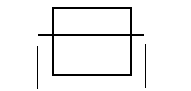
Hold Length: Guarantees that wherever a cut is given there exists a safety zone (also called dead zone) of length at least as the specified one to hold the material.
Important: Activating this option without defining its value will mean that all the parts can be rotated. To indicate that only a subset of the parts should be rotated, define a comma-separated list of part indexes or ranges as the option’s value. For example: 1,3,5-10 (note the use of the dash “-“ to define the ranges).
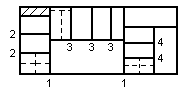
Restrict Cutting Levels: A cutting level is the action of executing parallel cuts at the same dimension. Every time the cut direction changes, the number of levels is incremented by 1. When restricting the cutting levels you’re reducing the complexity of the cutting variants generated by the calculation engine.
Note: The number of levels restriction only applies to cut semiproducts and not to part semiproducts which are always assumed of level 0, that is, when activating this option, you are limiting the number of levels until reaching parts semiproducts or offcuts. Therefore, the actual number of levels in a pattern may be one or two units greater than the maximum number you specified, since it won’t include the levels necessary to extract parts and offcuts.
See also: Cutting Patterns.
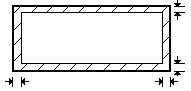
Material Margins: Reduce the effective area within the material by defining non-cut strips at their borders.
The value of this option is a comma-separated list containing the strip widths for left (Lef), right (Rig), bottom (bot) and top (Top) margins, in this order. By default, the margins will be applied the same to all of the materials in the launch. To apply margins only to a sub-set of the materials, end the above list with the character “:” (colon) and follow with another list containing the restricted material indexes or ranges. |


|
Corte 4 Copyright © 2003-2006 CorteOptimo.com All rights reserved |
|
4.2 |

|
Configuring the Launch |
|
4 |