|
The cutting options allows you prior adjusting of the cutting layouts generated by the calculation engine to fulfill existing technological requirements.
To configure your cutting options, from the Tools menu select Cutting options.
The cutting options are grouped into three categories:
Cut Type: Defines whether rectangles (sheets) or lengths (bars) are to be cut. When bars cutting is selected, all data introduced for the Width dimension are ignored and the optimization is realized by combining only the part lengths within the material lengths.
Minimum Reusable Offcut: Minimum dimensions of the reusable offcut. The reusable offcut is labeled in the cutting patterns and documented in the reports.
Technological Options: The first technological restriction, assumed as default by the calculation engine, is that of the rectangular parts will be extracted by using the so-called guillotine cutting.
Note: The guillotine cutting restriction conditions the way the calculation engine generates the cutting patterns and not necessarily the cutting technology used. Rip cutting, for example, always contains guillotine cutting. Since Corte can reach really striking optimizations, we are sure the program can be used with the same efficacy whereas materials are to be cut in rectangular pieces even if the technology used is less restrictive than guillotine cutting.
Other technological options conditioning both parts and cuts layouts can be defined to fulfill tooling and material requirements.
Note: Enabling of a technological option is to be realized in at most two steps: first you must check the option and then introduce a numerical value if required.
The technological options are:
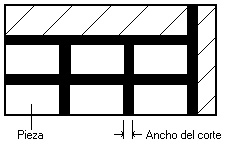
Cut Width: Width of the strip of material that the cutting tool smoothes out. Geometrically, it defines a distance or separation between parts.
Minimum Offcut Length: Minimum length for the offcut left (reusable or not) in the direction perpendicular to the cut. When active, cuts generating offcuts smaller than such length are not to be considered.
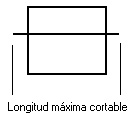
Maximum Cut Length: Maximum length the cutting tool can reach in the cut direction. For example, the length of the blade in plateshears cutting.
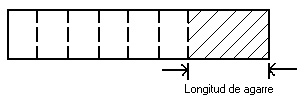
Holding Length: Length of a zone necessary to hold the material in the direction perpendicular to the cut.
Rotate Parts: Indicates if parts can be rotated 90 degrees in the cutting patterns. When active, chances for optimizing are increased significantly. A value of zero for either of the dimensions indicates that none reusable offcut should be detected. |


|
Corte 3 Professional Edition Copyright © 2003-2005 Neginter del Caribe Ltd. All rights reserved |
|
3.5 |

|
Preparing the Cutting Plan |
|
3 |
|
Cutting Options |