
|
Whenever allowed topologically, you can modify the order, location and direction of the cuts in a cutting pattern, or even delete redundant cuts, but preserving the current quantity of each part distributed. In other words, you can modify the cuts layout without modifying the parts distribution. This manual adjustment of a pattern is intended to help its practical execution, either by changing the execution order of the cuts or optimizing them by deleting the redundant ones.
Important: All of the adjustment options will modify the children semiproducts of the selected parent semiproduct. All of them are accessible in the Edit menu, the main tool bar and the context menu of the pattern view.
The adjustment options are: |


|
Corte 3 Professional Edition Copyright © 2003-2005 Neginter del Caribe Ltd. All rights reserved |
|
5.6 |

|
Working with the Solution |
|
5 |
|
Ajusting the Patterns |


|
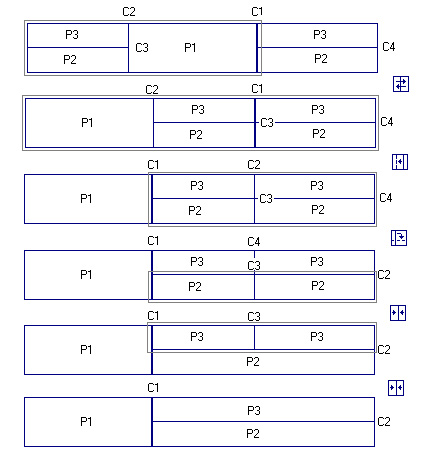
The figure below shows an example of how the adjustment options can be used to optimize the cuts in a pattern. The aim is to join the semiproducts that distributes the parts 2 and 3. |


|
|
Join: Unify the two semiproducts generated by a cut to form a single semiproduct and deletes the cut. Two semiproducts can join together if:
· Both of them are final-semiproducts and at least one of them is an offcut. · Both of them distribute the same part with the same repetition in cut direction. |
|
|
Exchange: Exchanges the two children semiproducts modifying this way the location of the cut in the parent semiproduct. |
|
|
Change to next: In a sequence of several consecutive cuts having the same direction, this option changes the original cut in the selected semiproduct to the next cut in the sequence. |
|
|
Change to previous: The same but changing to the previous cut. |
|
|
Change to horizontal: When a parent semiproduct is:
· vertically cut and one of its children is horizontally cut and the other one is an offcut, or · both children are horizontally cut at the same dimension,
cuts are interchanged so that the parent semiproduct is now left horizontally cut and both children vertically cut. |
|
|
Change to vertical: This option is symmetrically the same as the above one but for parent semiproducts that are horizontally cut. |